Guides + browser auditQuestion to evidence
Image engineering
ImageGuide
I put the image-delivery knowledge I kept using into a reference site, then built a browser auditor to check the page in front of me.
- 01Inspect a page
- 02Read the evidence
- 03Choose a correction
- 04Check the result
Advice needs somewhere to be tested
I have written about product images since 2018. Questions keep returning: which format, what dimensions, when to lazy-load and how to tell whether a change helped.
ImageGuide collects the reference material, practical guides and conversion tools. The browser extension applies those questions to an open page. Press handles local files.
The site runs on Sirv, and I work at Sirv. Keep that in mind when it recommends Sirv.
The extension keeps the uses separate
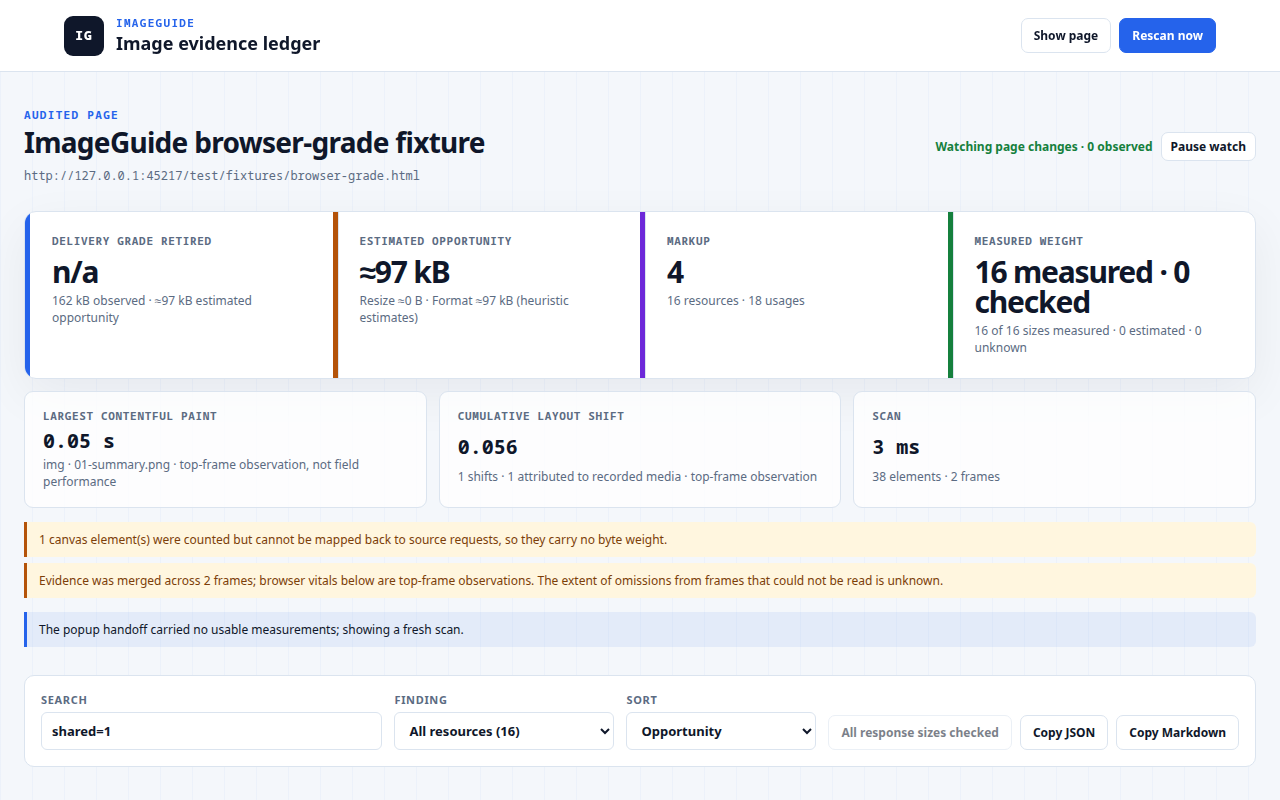
One file can appear in several places. The auditor groups the shared resource but retains each element’s dimensions and markup findings. A hero and a small card do not need the same image size or alt text.
Version 0.4.0 adds a persistent audit view, response-size checks and browser observations for LCP and layout shifts. The screenshot above is the 0.4.0 audit of a test fixture from the repository.
The build note explains why measured bytes, per-element findings and estimated savings stay separate.
Permission follows the action
The audit starts when you click the extension. The extension does not send the report to ImageGuide. Optional cross-origin response-size checks request the permission they need and make requests without credentials.
The extension doesn’t change the site. Copy the report as Markdown or JSON and give it to whoever fixes the images.
The files need their own tool
Converting a few images in a web tool and processing a folder of photographs are different jobs. Press provides local comparison and conversion. ImageGuide explains the choices and helps identify what is worth fixing.
What remains imperfect
The auditor cannot see every frame or closed shadow root, and conversion savings remain estimates. The site and desktop app have different capabilities, so their documentation needs regular alignment.