
An image can be the right size for a hero and way too big for a thumbnail on the same page. Count its URL once and you get a tidy resource list. Judge every use as if it were the hero and you get the wrong answer.
That problem shaped version 0.4.0 of the ImageGuide extension.
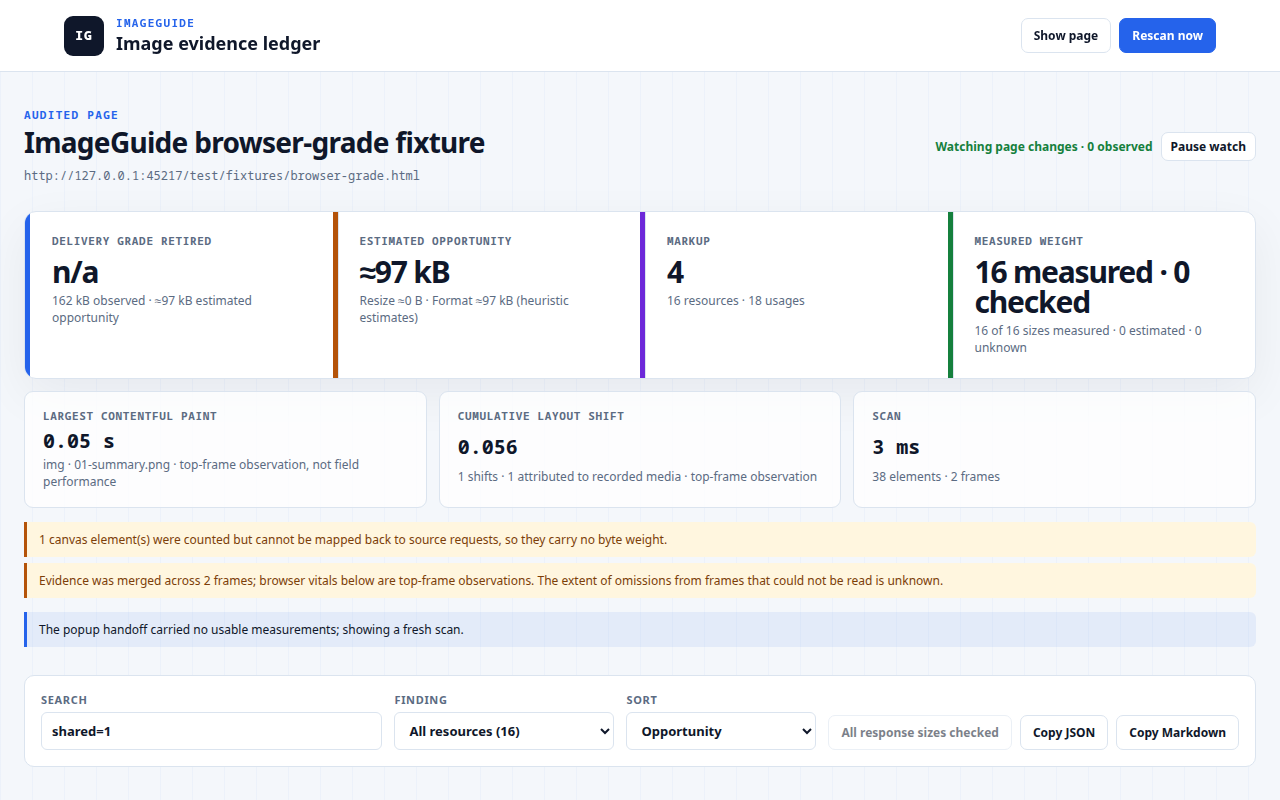
The 0.4.0 audit of a test fixture. 16 image resources, 18 usages, and a savings number clearly marked as an estimate.
One resource, several uses
Look at the Markup card above: 16 resources, 18 usages. Some images are used more than once. The extension groups each shared resource but keeps every element that uses it, and each use gets its own slot size and markup findings.
So a wide image can be fine at the top of the page and wasteful inside a small card. The card can be missing alt text even when the hero’s alt text is perfect. The file and the place it’s used need separate records.
Responsive images get the same care. The extension tries to match the candidate the browser picked to its srcset descriptor. If it can’t match it with confidence, the source dimensions stay unknown. A guess would produce a nice big resize opportunity that isn’t real.
Knowing the size doesn’t mean knowing the saving
The browser can report encoded size or transfer size through Resource Timing. Those aren’t the same number, and for cross-origin images you often get neither.
An optional check can ask the server for response headers. It requests host permission when it needs it and sends no credentials. If a size isn’t available, the report says so.
Even with a known input size, the extension hasn’t converted anything. Its savings figure comes from a model of resize and format changes, so the interface calls it an estimate. That’s the “≈97 kB” in the screenshot.
| Statement | What supports it |
|---|---|
| This response had this encoded size | A browser timing entry or a validated response header |
| This element is oversized for its slot | Confirmed source dimensions and the current layout |
| A different format may save bytes | A conversion model, not an encoded file |
| This output saved this many bytes | A real conversion, outside the extension |
For that last row, I built Press. It encodes the local file and shows you the result.
In the viewport doesn’t mean LCP
A lazy image that is on screen right now isn’t necessarily the page’s Largest Contentful Paint element. The visitor may have scrolled. The extension keeps the viewport finding separate from the browser’s own LCP entry.
Layout shift is the same. The element that moved isn’t always the element that caused the move. The report shows which element shifted and stops there.
Say what the scan missed
The scan has limits on elements, resources, usages and payload size, and the report tells you when it hits one. Frames it can’t read, closed shadow roots and canvas pixels leave gaps too. You can see two of those warnings in the screenshot: a canvas it counted but couldn’t map to a request, and a note that anything inside unreadable frames is missing.
The source and fixture tests show exactly where those limits are. “Unknown” makes a less impressive dashboard. It’s a much more useful answer for the person fixing the page.