# Press: a pleasant detour into desktop software
Zed made me want to try GPUI. Press gave me a folder of images to work on. A personal detour into Rust, responsive interfaces and an app still finding its shape.
I started Press because I wanted to play with GPUI.
I'd always been impressed by how fast [Zed](https://zed.dev/) feels. Trying [Zeron](https://zeron.sh/) for agent work gave me that reaction again: the speed is mind-fucking-blowing. It makes me want to get under the hood and build something with that kind of responsiveness myself.
[GPUI](https://gpui.rs/), the Rust UI framework from Zed's creators, was the reason to start. An image tool gave me something useful to build with it.
That's the origin of [Press](/projects/press/). The product direction is still taking shape. The curiosity was there first.
## A folder of images was a good place to start
Images are familiar territory for me. Between [Sirv Studio](/projects/sirv-studio/) and [ImageGuide](/projects/imageguide/), I already spend plenty of time thinking about how people prepare, inspect and use them. A folder on my own computer gave the GPUI experiment a concrete job.
Open it. See what's in it. Find the heavy files. Try a conversion. Look at the result.
There's enough there to make an actual application: a file list, thumbnails, sorting, selection, settings and a comparison view. There is also a very direct way to judge whether it is useful. I have the input files and the output files in front of me.
The first audit found PNGs hiding behind WebP filenames in my own ImageGuide directory. I've [written about that discovery separately](/posts/59-webp-files-were-pngs/). It gave the experiment a useful first result before conversion even existed.
Press now audits folders and converts images locally to WebP, AVIF, JPEG XL and JPEG. The normal copy workflow writes to an output folder. Auditing, comparing and converting don't require sending those images to a server.
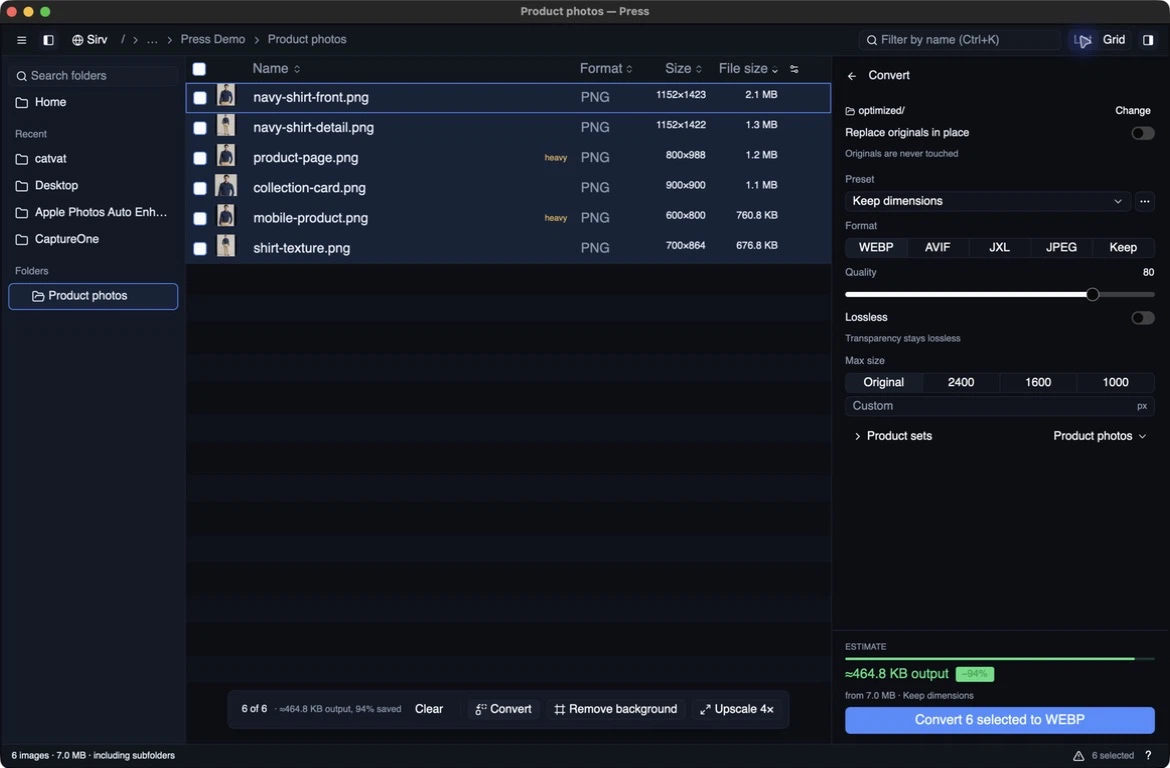 *The audit view in Press 0.6.6, captured on macOS on September 8, 2026. [Capture details and demo photo credits](https://github.com/IgorVaryvoda/press/blob/main/docs/screenshots.md).*
## The appeal of GPUI
What I like about Zed and Zeron is the feeling of the interface keeping up with me. I'm describing my experience using them, not a benchmark comparison. That feeling was enough to make GPUI interesting.
GPUI gives me a Rust interface with GPU-accelerated rendering. Zed's team has a [technical explanation of the rendering approach](https://zed.dev/blog/videogame), including how it draws the rectangles, text and images that make up an application window.
The API also has some familiar ideas for someone building web interfaces: nested elements, flex layouts and composable styling. The composition is written in Rust. Press currently uses [`gpui-kit`](https://github.com/IgorVaryvoda/press/blob/main/Cargo.toml) to bring the matching GPUI, platform, component and asset crates together.
That was a combination I wanted to explore: a different way to build a desktop interface, with an application I already admired as a reason to investigate it.
I still build web software. Studio is my main project. Press is a chance to work with a different set of tools and a much more contained interaction: a person, a window and their files.
## A fast renderer still needs sensible work behind it
An image tool is a useful reminder that drawing the window is only part of responsiveness.
Press reads image headers first. It doesn't need to fully decode a photograph just to list its dimensions. The list is virtualised, and thumbnails are decoded off the main thread as rows become visible. Opening a folder doesn't mean decoding every image in it before you can start looking around.
Conversion has a different workload. A file being encoded needs its decoded image in memory, so running more conversions at once is not automatically better. Press [bounds concurrency by encoder](https://github.com/IgorVaryvoda/press#converting): WebP and AVIF use different limits, while JPEG XL processes one file at a time because its encoder uses multiple cores internally. GPUI's rendering doesn't make the encoders free.
Even a control as ordinary as the quality slider raises a scheduling question. The savings estimate comes from encoding a sample. Starting that work for every pixel of a drag would be wasteful, so it waits for a short pause before running again.
These are the parts that turn a framework experiment into an application. I wanted to try a fast UI framework; the folder gives me plenty of other work to arrange around it.
## The comparison view gives the app a purpose
A file-size reduction is interesting. Seeing what happened to the image is more useful.
Press puts the original and converted result beside each other. I can change the format, quality and maximum size, then step through the images without setting everything up again. That makes the application a place to make a decision, rather than just a button that produces smaller files.
There are small choices in that workflow that matter. When an output-size limit is set, the original side is resized for comparison too, so I'm comparing compression at the intended dimensions. After a batch finishes, the result view reads the files that were actually written instead of generating another preview.
*The audit view in Press 0.6.6, captured on macOS on September 8, 2026. [Capture details and demo photo credits](https://github.com/IgorVaryvoda/press/blob/main/docs/screenshots.md).*
## The appeal of GPUI
What I like about Zed and Zeron is the feeling of the interface keeping up with me. I'm describing my experience using them, not a benchmark comparison. That feeling was enough to make GPUI interesting.
GPUI gives me a Rust interface with GPU-accelerated rendering. Zed's team has a [technical explanation of the rendering approach](https://zed.dev/blog/videogame), including how it draws the rectangles, text and images that make up an application window.
The API also has some familiar ideas for someone building web interfaces: nested elements, flex layouts and composable styling. The composition is written in Rust. Press currently uses [`gpui-kit`](https://github.com/IgorVaryvoda/press/blob/main/Cargo.toml) to bring the matching GPUI, platform, component and asset crates together.
That was a combination I wanted to explore: a different way to build a desktop interface, with an application I already admired as a reason to investigate it.
I still build web software. Studio is my main project. Press is a chance to work with a different set of tools and a much more contained interaction: a person, a window and their files.
## A fast renderer still needs sensible work behind it
An image tool is a useful reminder that drawing the window is only part of responsiveness.
Press reads image headers first. It doesn't need to fully decode a photograph just to list its dimensions. The list is virtualised, and thumbnails are decoded off the main thread as rows become visible. Opening a folder doesn't mean decoding every image in it before you can start looking around.
Conversion has a different workload. A file being encoded needs its decoded image in memory, so running more conversions at once is not automatically better. Press [bounds concurrency by encoder](https://github.com/IgorVaryvoda/press#converting): WebP and AVIF use different limits, while JPEG XL processes one file at a time because its encoder uses multiple cores internally. GPUI's rendering doesn't make the encoders free.
Even a control as ordinary as the quality slider raises a scheduling question. The savings estimate comes from encoding a sample. Starting that work for every pixel of a drag would be wasteful, so it waits for a short pause before running again.
These are the parts that turn a framework experiment into an application. I wanted to try a fast UI framework; the folder gives me plenty of other work to arrange around it.
## The comparison view gives the app a purpose
A file-size reduction is interesting. Seeing what happened to the image is more useful.
Press puts the original and converted result beside each other. I can change the format, quality and maximum size, then step through the images without setting everything up again. That makes the application a place to make a decision, rather than just a button that produces smaller files.
There are small choices in that workflow that matter. When an output-size limit is set, the original side is resized for comparison too, so I'm comparing compression at the intended dimensions. After a batch finishes, the result view reads the files that were actually written instead of generating another preview.
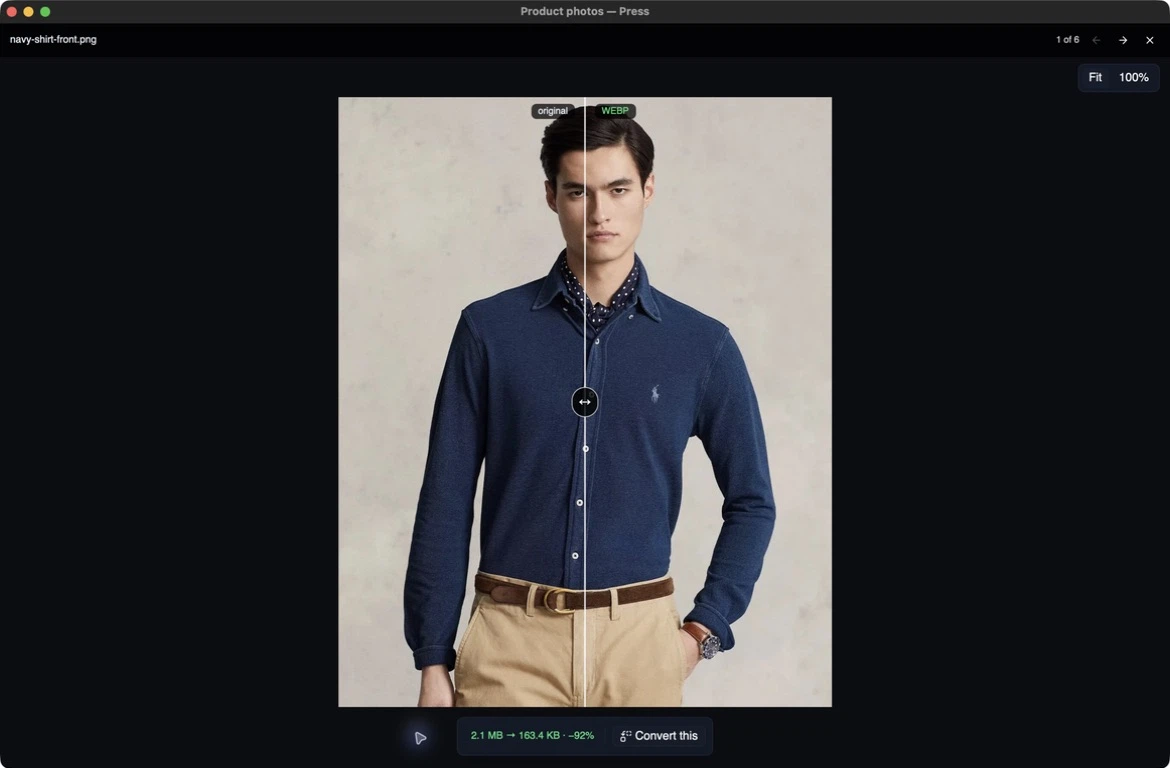 *The September 2026 comparison view. The useful question is whether I would use the output, not just how many bytes it saved.*
This is the scale of work I enjoy in Press. A folder browser, a comparison, a better place for a control. Each change gives me something concrete to try, and often suggests the next improvement.
## Built with AI, shaped by using it
Press is AI-assisted, like my other recent work. I am not presenting it as a story about writing every line of Rust by hand.
The attraction is getting to explore the technology through a real tool. I can have help with implementation and still care very specifically about what I want the application to do, how it behaves and whether I enjoy using it.
Sometimes I start a project precisely because I want to play with a new technology. Building something useful gives that play a direction. With Press, I get to experiment with GPUI and end up with an image tool I can keep improving.
## I haven't decided its final shape
I enjoy working on Press, and I don't yet have a completely clear vision for what it should become. I'm happy to let some of that emerge from building and using it.
There is an obvious connection to Studio. Press already has [explicit Sirv transfers and hosted Studio image operations](https://github.com/IgorVaryvoda/press#sirv-studio-api). Those are separate from the local audit and conversion workflow: choosing a remote operation is what sends a file out.
I can see Press becoming a useful way for people to discover Studio. Someone starts with files on their machine, finds a desktop tool they like, and later needs shared review, supplier workflows or more hosted processing. I'd like that connection to grow out of Press being useful in its own right.
That's a promising direction, not a finished strategy. For now, I have an app I enjoy developing, a technology I wanted to explore and some real image work for it to do.
I wanted to try GPUI. Press is what I built with it. I'm enjoying finding out what comes next.
[Try Press](https://www.imageguide.dev/press/) or [look through the source](https://github.com/IgorVaryvoda/press).
---
[Canonical HTML](https://www.varyvoda.com/posts/press-a-pleasant-detour-into-desktop-software/) · [Sitemap](https://www.varyvoda.com/sitemap.xml)
*The September 2026 comparison view. The useful question is whether I would use the output, not just how many bytes it saved.*
This is the scale of work I enjoy in Press. A folder browser, a comparison, a better place for a control. Each change gives me something concrete to try, and often suggests the next improvement.
## Built with AI, shaped by using it
Press is AI-assisted, like my other recent work. I am not presenting it as a story about writing every line of Rust by hand.
The attraction is getting to explore the technology through a real tool. I can have help with implementation and still care very specifically about what I want the application to do, how it behaves and whether I enjoy using it.
Sometimes I start a project precisely because I want to play with a new technology. Building something useful gives that play a direction. With Press, I get to experiment with GPUI and end up with an image tool I can keep improving.
## I haven't decided its final shape
I enjoy working on Press, and I don't yet have a completely clear vision for what it should become. I'm happy to let some of that emerge from building and using it.
There is an obvious connection to Studio. Press already has [explicit Sirv transfers and hosted Studio image operations](https://github.com/IgorVaryvoda/press#sirv-studio-api). Those are separate from the local audit and conversion workflow: choosing a remote operation is what sends a file out.
I can see Press becoming a useful way for people to discover Studio. Someone starts with files on their machine, finds a desktop tool they like, and later needs shared review, supplier workflows or more hosted processing. I'd like that connection to grow out of Press being useful in its own right.
That's a promising direction, not a finished strategy. For now, I have an app I enjoy developing, a technology I wanted to explore and some real image work for it to do.
I wanted to try GPUI. Press is what I built with it. I'm enjoying finding out what comes next.
[Try Press](https://www.imageguide.dev/press/) or [look through the source](https://github.com/IgorVaryvoda/press).
---
[Canonical HTML](https://www.varyvoda.com/posts/press-a-pleasant-detour-into-desktop-software/) · [Sitemap](https://www.varyvoda.com/sitemap.xml)