# Optimising a Vue/Nuxt site with Sirv
How I handled responsive images, lazy loading, CDN delivery, placeholders, and media galleries on Sirv Experts.
> Historical guide from 2023. The examples describe that version of Sirv Experts and its Nuxt configuration. The script-loading error handler was corrected in September 2026. For current delivery advice, read [Image SEO in 2026](/posts/image-seo-2026/).
My latest project is [Sirv Experts](https://experts.sirv.com), a directory of professionals proficient with Sirv that we can vouch for.
 The project is powered by Nuxt and has some tricky parts about it, like an [interactive map of experts closest to you](https://experts.sirv.com/360-product-photography/near-me), a portfolio showcase of each expert, and lots of images all over the website.
That made it a useful test for Sirv's image delivery and media viewer.
## The problem
We've compiled a list of things that we need to optimize for the project, and it's quite a list:
- Optimizing images, serving them in the optimal format and size on the fly
- Lazy loading images
- Improving first contentful paint & reducing layout shift
- Hosting static assets on a CDN
- Showcasing experts' portfolios consisting of various media like images, videos, 360 spins and 3D models
## The solution
I'll start with some boasting, of course. 😀
The project is powered by Nuxt and has some tricky parts about it, like an [interactive map of experts closest to you](https://experts.sirv.com/360-product-photography/near-me), a portfolio showcase of each expert, and lots of images all over the website.
That made it a useful test for Sirv's image delivery and media viewer.
## The problem
We've compiled a list of things that we need to optimize for the project, and it's quite a list:
- Optimizing images, serving them in the optimal format and size on the fly
- Lazy loading images
- Improving first contentful paint & reducing layout shift
- Hosting static assets on a CDN
- Showcasing experts' portfolios consisting of various media like images, videos, 360 spins and 3D models
## The solution
I'll start with some boasting, of course. 😀
 GTmetrix score of 100%, and a 0.5s largest contentful paint.
 And a 99% score on LightHouse. Yeah, we're working on accessibility right now, I know it's important. 😀
## Image optimization and lazy loading
Sirv's [automatic responsive images](https://sirv.com/help/articles/responsive-images-smv/) covered the first two items. Images are lazy-loaded and served in a suitable format and size.
Sirv.js requests a transformed version of the master image for the current device. We first loaded the script in `nuxt.config.js`, then moved it to the pages that actually needed it.
```js
//components/footer.vue
getSirv()
{
return new Promise((resolve, reject) => {
const script = document.createElement('script')
script.src = 'https://scripts.sirv.com/sirvjs/v3/sirv.js'
script.type = 'text/javascript'
script.setAttribute('async', '')
script.setAttribute('defer', '')
script.onload = resolve
script.onerror = () => {
reject(new Error('Failed to load the Sirv script'));
};
document.body.appendChild(script)
})
}
```
Alternatively, just use the [npm module](https://www.npmjs.com/package/sirv-media-viewer-script).
Our backend already stored its images on Sirv, so no migration was needed. The remaining issue was the placeholder shown while an image loaded.
## Improving first contentful paint & reducing layout shift
Sirv's Dynamic Imaging parameters can return a placeholder at the required size, format, and colour. We used 10% quality for the small images on the [map page](https://experts.sirv.com/360-product-photography/anywhere).
```html
And a 99% score on LightHouse. Yeah, we're working on accessibility right now, I know it's important. 😀
## Image optimization and lazy loading
Sirv's [automatic responsive images](https://sirv.com/help/articles/responsive-images-smv/) covered the first two items. Images are lazy-loaded and served in a suitable format and size.
Sirv.js requests a transformed version of the master image for the current device. We first loaded the script in `nuxt.config.js`, then moved it to the pages that actually needed it.
```js
//components/footer.vue
getSirv()
{
return new Promise((resolve, reject) => {
const script = document.createElement('script')
script.src = 'https://scripts.sirv.com/sirvjs/v3/sirv.js'
script.type = 'text/javascript'
script.setAttribute('async', '')
script.setAttribute('defer', '')
script.onload = resolve
script.onerror = () => {
reject(new Error('Failed to load the Sirv script'));
};
document.body.appendChild(script)
})
}
```
Alternatively, just use the [npm module](https://www.npmjs.com/package/sirv-media-viewer-script).
Our backend already stored its images on Sirv, so no migration was needed. The remaining issue was the placeholder shown while an image loaded.
## Improving first contentful paint & reducing layout shift
Sirv's Dynamic Imaging parameters can return a placeholder at the required size, format, and colour. We used 10% quality for the small images on the [map page](https://experts.sirv.com/360-product-photography/anywhere).
```html
![]() ```
Adding [blur](https://sirv.com/help/articles/dynamic-imaging/stylize/blur/) works pretty nice for bigger images, but we didn't really have any use-case for this.
We also preloaded critical images and prefetched the Sirv CDN and Google Fonts domains in `nuxt.config.js`:
```js
//nuxt.config.js -
head: {
//your meta and other stuff
link: [
{ rel: 'preconnect', href: 'https://scripts.sirv.com/', crossorigin:true},
{ rel: 'preconnect', href: 'https://experts-content.sirv.com', crossorigin:true},
{ rel: 'preconnect', href: 'https://fonts.googleapis.com', crossorigin:true},
{ rel: 'dns-prefetch', href: 'https://scripts.sirv.com'},
{ rel: 'dns-prefetch', href: 'https://experts-content.sirv.com'},
{ rel: 'preload', as: 'style', href: 'https://fonts.googleapis.com/css?family=Source+Sans+Pro:200,300,400,600&display=swap' }
]
}
```
## Hosting static assets
We just slapped all of our static assets on the CDN 😀
It's pretty much a single line in the nuxt.config.js file:
```js
//nuxt.config.js
build: {
publicPath: 'https://experts-content.sirv.com/_nuxt/'
//your other options
}
```
You'd still have to upload your assets to the CDN after every build,
which can be done via a [github action](https://github.com/marketplace/actions/sirv-upload) [(docs here)](https://sirv.com/help/articles/upload-images-to-sirv-with-github-actions/) or a [deployment script like this](https://gist.github.com/IgorVaryvoda/40036108fda952d318abf397b53cc6da).
So now we have all of our images optimized, lazy-loaded, and hosted on the CDN, but we still have to deal with the experts' portfolios.
## Showcasing experts' portfolios
Sirv's [Media Viewer](https://sirv.com/help/articles/media-viewer/) handles each expert's mixed-media gallery. A custom component reads the portfolio data and builds the viewer.
See the result [here](https://experts.sirv.com/revo-photo-revo-north-america). Or use this Nintendo Switch gallery:
The code for this gallery is simple and self-explanatory:
```html
```
Clean and simple.
There is also a [Vue 3 library](https://github.com/Mefistosss/vue-js-sirv-viewer) for working with the viewer.
UPD: I've recently written an [integration with Nuxt Image](https://image.nuxt.com/providers/sirv), which makes working with Sirv images in Nuxt freaking amazing.
---
[Canonical HTML](https://www.varyvoda.com/experts-nuxt-Sirv/) · [Sitemap](https://www.varyvoda.com/sitemap.xml)
```
Adding [blur](https://sirv.com/help/articles/dynamic-imaging/stylize/blur/) works pretty nice for bigger images, but we didn't really have any use-case for this.
We also preloaded critical images and prefetched the Sirv CDN and Google Fonts domains in `nuxt.config.js`:
```js
//nuxt.config.js -
head: {
//your meta and other stuff
link: [
{ rel: 'preconnect', href: 'https://scripts.sirv.com/', crossorigin:true},
{ rel: 'preconnect', href: 'https://experts-content.sirv.com', crossorigin:true},
{ rel: 'preconnect', href: 'https://fonts.googleapis.com', crossorigin:true},
{ rel: 'dns-prefetch', href: 'https://scripts.sirv.com'},
{ rel: 'dns-prefetch', href: 'https://experts-content.sirv.com'},
{ rel: 'preload', as: 'style', href: 'https://fonts.googleapis.com/css?family=Source+Sans+Pro:200,300,400,600&display=swap' }
]
}
```
## Hosting static assets
We just slapped all of our static assets on the CDN 😀
It's pretty much a single line in the nuxt.config.js file:
```js
//nuxt.config.js
build: {
publicPath: 'https://experts-content.sirv.com/_nuxt/'
//your other options
}
```
You'd still have to upload your assets to the CDN after every build,
which can be done via a [github action](https://github.com/marketplace/actions/sirv-upload) [(docs here)](https://sirv.com/help/articles/upload-images-to-sirv-with-github-actions/) or a [deployment script like this](https://gist.github.com/IgorVaryvoda/40036108fda952d318abf397b53cc6da).
So now we have all of our images optimized, lazy-loaded, and hosted on the CDN, but we still have to deal with the experts' portfolios.
## Showcasing experts' portfolios
Sirv's [Media Viewer](https://sirv.com/help/articles/media-viewer/) handles each expert's mixed-media gallery. A custom component reads the portfolio data and builds the viewer.
See the result [here](https://experts.sirv.com/revo-photo-revo-north-america). Or use this Nintendo Switch gallery:
The code for this gallery is simple and self-explanatory:
```html
```
Clean and simple.
There is also a [Vue 3 library](https://github.com/Mefistosss/vue-js-sirv-viewer) for working with the viewer.
UPD: I've recently written an [integration with Nuxt Image](https://image.nuxt.com/providers/sirv), which makes working with Sirv images in Nuxt freaking amazing.
---
[Canonical HTML](https://www.varyvoda.com/experts-nuxt-Sirv/) · [Sitemap](https://www.varyvoda.com/sitemap.xml)
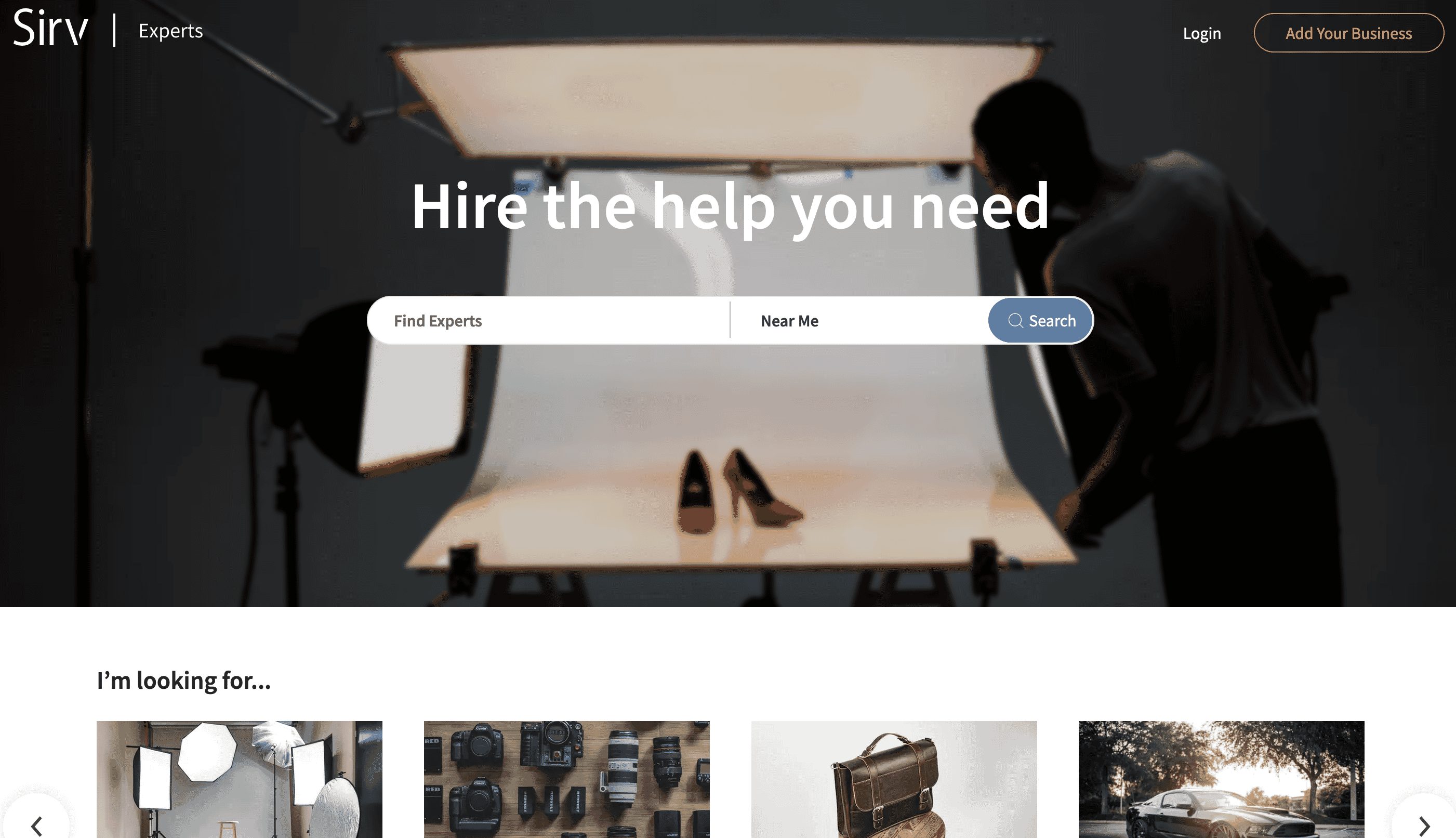 The project is powered by Nuxt and has some tricky parts about it, like an [interactive map of experts closest to you](https://experts.sirv.com/360-product-photography/near-me), a portfolio showcase of each expert, and lots of images all over the website.
That made it a useful test for Sirv's image delivery and media viewer.
## The problem
We've compiled a list of things that we need to optimize for the project, and it's quite a list:
- Optimizing images, serving them in the optimal format and size on the fly
- Lazy loading images
- Improving first contentful paint & reducing layout shift
- Hosting static assets on a CDN
- Showcasing experts' portfolios consisting of various media like images, videos, 360 spins and 3D models
## The solution
I'll start with some boasting, of course. 😀
The project is powered by Nuxt and has some tricky parts about it, like an [interactive map of experts closest to you](https://experts.sirv.com/360-product-photography/near-me), a portfolio showcase of each expert, and lots of images all over the website.
That made it a useful test for Sirv's image delivery and media viewer.
## The problem
We've compiled a list of things that we need to optimize for the project, and it's quite a list:
- Optimizing images, serving them in the optimal format and size on the fly
- Lazy loading images
- Improving first contentful paint & reducing layout shift
- Hosting static assets on a CDN
- Showcasing experts' portfolios consisting of various media like images, videos, 360 spins and 3D models
## The solution
I'll start with some boasting, of course. 😀
 GTmetrix score of 100%, and a 0.5s largest contentful paint.
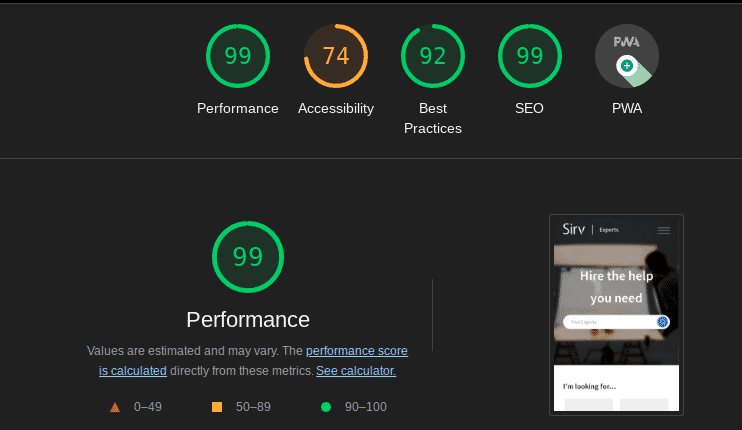 And a 99% score on LightHouse. Yeah, we're working on accessibility right now, I know it's important. 😀
## Image optimization and lazy loading
Sirv's [automatic responsive images](https://sirv.com/help/articles/responsive-images-smv/) covered the first two items. Images are lazy-loaded and served in a suitable format and size.
Sirv.js requests a transformed version of the master image for the current device. We first loaded the script in `nuxt.config.js`, then moved it to the pages that actually needed it.
```js
//components/footer.vue
getSirv()
{
return new Promise((resolve, reject) => {
const script = document.createElement('script')
script.src = 'https://scripts.sirv.com/sirvjs/v3/sirv.js'
script.type = 'text/javascript'
script.setAttribute('async', '')
script.setAttribute('defer', '')
script.onload = resolve
script.onerror = () => {
reject(new Error('Failed to load the Sirv script'));
};
document.body.appendChild(script)
})
}
```
Alternatively, just use the [npm module](https://www.npmjs.com/package/sirv-media-viewer-script).
Our backend already stored its images on Sirv, so no migration was needed. The remaining issue was the placeholder shown while an image loaded.
## Improving first contentful paint & reducing layout shift
Sirv's Dynamic Imaging parameters can return a placeholder at the required size, format, and colour. We used 10% quality for the small images on the [map page](https://experts.sirv.com/360-product-photography/anywhere).
```html
And a 99% score on LightHouse. Yeah, we're working on accessibility right now, I know it's important. 😀
## Image optimization and lazy loading
Sirv's [automatic responsive images](https://sirv.com/help/articles/responsive-images-smv/) covered the first two items. Images are lazy-loaded and served in a suitable format and size.
Sirv.js requests a transformed version of the master image for the current device. We first loaded the script in `nuxt.config.js`, then moved it to the pages that actually needed it.
```js
//components/footer.vue
getSirv()
{
return new Promise((resolve, reject) => {
const script = document.createElement('script')
script.src = 'https://scripts.sirv.com/sirvjs/v3/sirv.js'
script.type = 'text/javascript'
script.setAttribute('async', '')
script.setAttribute('defer', '')
script.onload = resolve
script.onerror = () => {
reject(new Error('Failed to load the Sirv script'));
};
document.body.appendChild(script)
})
}
```
Alternatively, just use the [npm module](https://www.npmjs.com/package/sirv-media-viewer-script).
Our backend already stored its images on Sirv, so no migration was needed. The remaining issue was the placeholder shown while an image loaded.
## Improving first contentful paint & reducing layout shift
Sirv's Dynamic Imaging parameters can return a placeholder at the required size, format, and colour. We used 10% quality for the small images on the [map page](https://experts.sirv.com/360-product-photography/anywhere).
```html